Building my second brain 🧠 with Obsidian
This article will take Obsidian as an example to share my practice of using Obsidian to build a second brain!
The content of this article is out of date. Please refer to the official website LifeOS for more information.
Preface
What is Obsidian?

Here is how it introduces itself on the official website:
- Obsidian is the private and flexible note‑taking app that adapts to the way you think.
What I especially appreciate is its rich plugin ecosystem. If you like Vscode, then you will probably like Obsidian as well. The only difference is that Vscode is for writing code, and Obsidian is for taking notes.
First Brain VS Second Brain
The first brain is our actual brain. It never stops working as long as we are alive. It performs tasks such as knowledge management, task management, and goal management. Most of the time, we cannot multitask, thus the first brain acts more like a CPU, with various tasks competing for CPU cycles. When there are too many tasks to handle, the brain becomes overwhelmed. It has to deal with current tasks while keeping the context of other tasks to switch between them, so we cannot focus on executing the current task. This is when an external system is needed to assist the first brain, which is the second brain.
The second brain is an external system. If we compare the first brain to a CPU, then the second brain is more like a storage system. It acts as a buffer between the first brain and the real world, reducing the load on the first brain so it can focus on the current matter. It can be compared to memory and hard disks, but memory is more frequent in communication with the CPU (the first brain) and has a faster read speed. This storage system stores things that the first brain doesn’t need to focus on all the time. Of course, it’s up to the first brain to decide whether these things need to be stored. The content could be notes, to-dos, processes, and the medium could be text, images, videos.
For example, when we use the second brain for task management, important and urgent items are stored in memory, while unimportant and non-urgent items are stored on the hard disk; this week’s tasks are in memory, while this month’s tasks might be on the hard disk. Therefore, by utilizing the second brain, we can focus on the present without any pressure and switch contexts when necessary.
This article will use Obsidian as an example to share my practice in building a second brain! You may call it a second brain, but looking at it from different angles, I could also refer to it as “LifeOS,” because I record everything concerning life and work upon it. Additionally, it could be termed a “programmable personal productivity system.” I have written considerable code on it to do some querying and automation, and it is also the productivity system that I use to manage tasks and goals. It could even be likened to a “Monorepo project,” where every folder represents a project, and the README.md within the project is like the Package.json, describing the metadata of the current project.
📢 Attention: This system is not a top-down one with pre-established processes to implement. It gradually formed as I used Obsidian and is still evolving. Let’s tentatively call the current version 1.0. The purpose of sharing it now is to inspire others to improve their systems! I have already written an Obsidian Periodic PARA plugin to support this system! With this plugin, you don’t need any programming background. You can easily create periodic and PARA notes by simple visual clicks!
My Practice
I adopt two systems: one for knowledge management and another for periodic notes. The former manages knowledge with dimensions like project/area/resource, and the latter manages tasks/goals/time with time as the dimension.
Core Systems
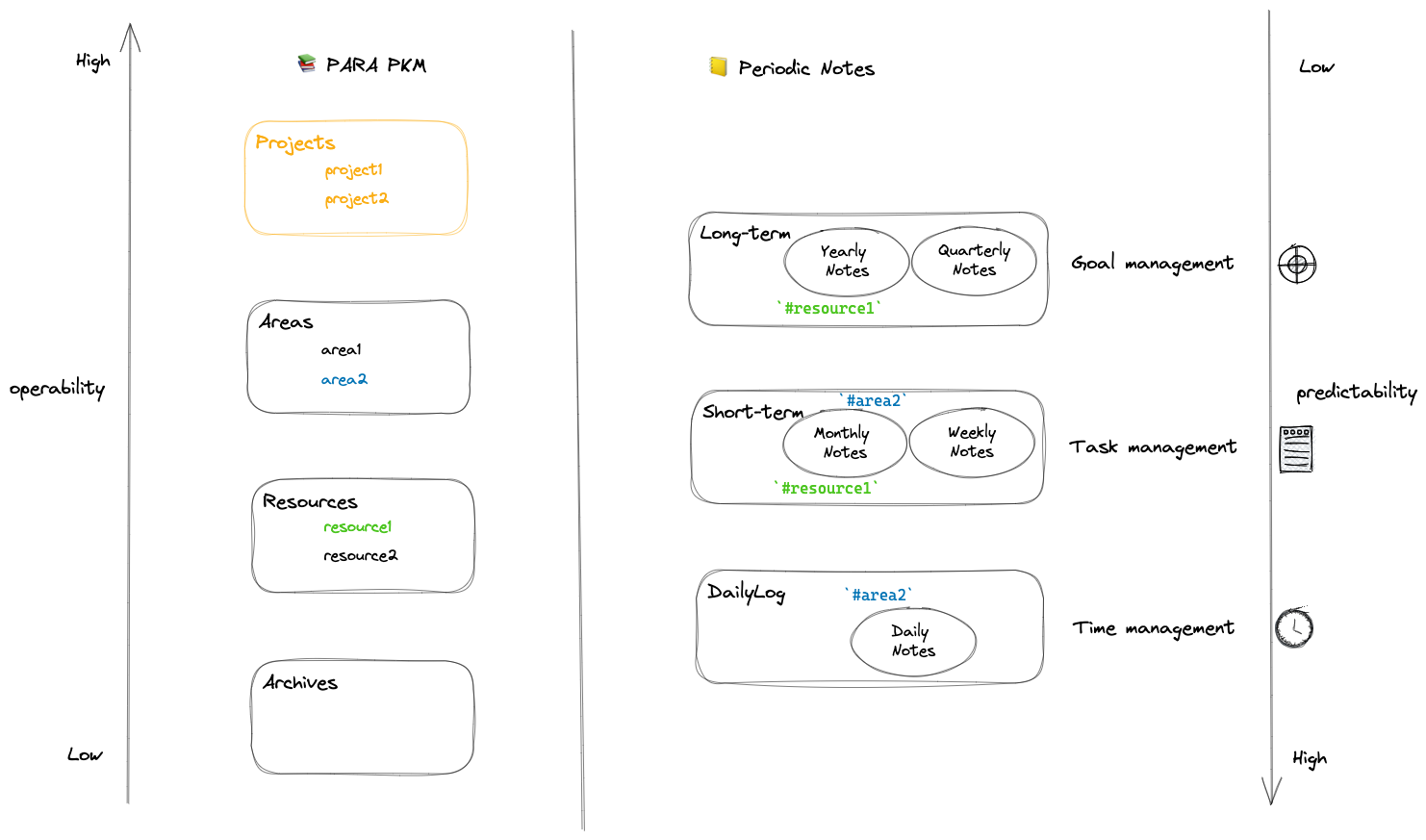
- Knowledge management: Using the PARA system
- Projects -> Projects are a series of tasks related to a goal with a deadline.
- Areas -> Areas are activity domains that need to maintain certain standards over time.
- Resources -> Resources are topics or subjects of ongoing interest.
- Archives -> Archives are inactive items from the above three categories.
- Periodic notes
- Long-term: Top-down, focusing on long-term goals.
- Three-year Review
- Annual Review
- Quarterly Review
- Short-term: Bottom-up, focusing on short-term tasks.
- Monthly Review
- Weekly Review
- Daily: Capturing thoughts and insights, achieving self-awareness; time consumption statistics, focusing on projects.
- Daily Note
- Long-term: Top-down, focusing on long-term goals.
The closer to Projects the PARA component, the more actionable it is; the more long-term the periodic note, the less predictable it is;
These two systems effectively create two contexts that keep me focused:
- One based on time (periodic notes), i.e., when I reach a certain time node, I work based on the corresponding periodic notes, and the notes have enough context;
- The other based on the topic (PARA), i.e., when I want to research a topic, I work based on the index of the corresponding topic (README.md), and the notes have already collected a lot of context;
Aspect-oriented Subsystem
Beneath the two systems mentioned above, there’s a hidden subsystem for managing tasks/goals/time, primarily through “periodic notes”:
- Task management
- Collecting via daily/weekly notes.
- Organizing via weekly/monthly reviews.
- Goal management
- Planning annual goals with the annual review.
- Splitting annual goals with the quarterly review.
- Breaking down pending items with the monthly review.
- Top-down sorting (through goal decomposition).
- Bottom-up sorting (through collection decomposition -> daily/weekly notes).
- Time management
- Manually tracking the time spent on various projects in the and its proportions, adjusting time investment.
- Using scripts in daily, weekly, monthly, quarterly, and annual reviews to automatically track the time spent on various projects and their proportions, reviewing time investment.
You might be curious that the above subsystem seems to only use “periodic notes.” In fact, the two main systems are connected through two methods.
Connection
How systems are associated
Tag Connection
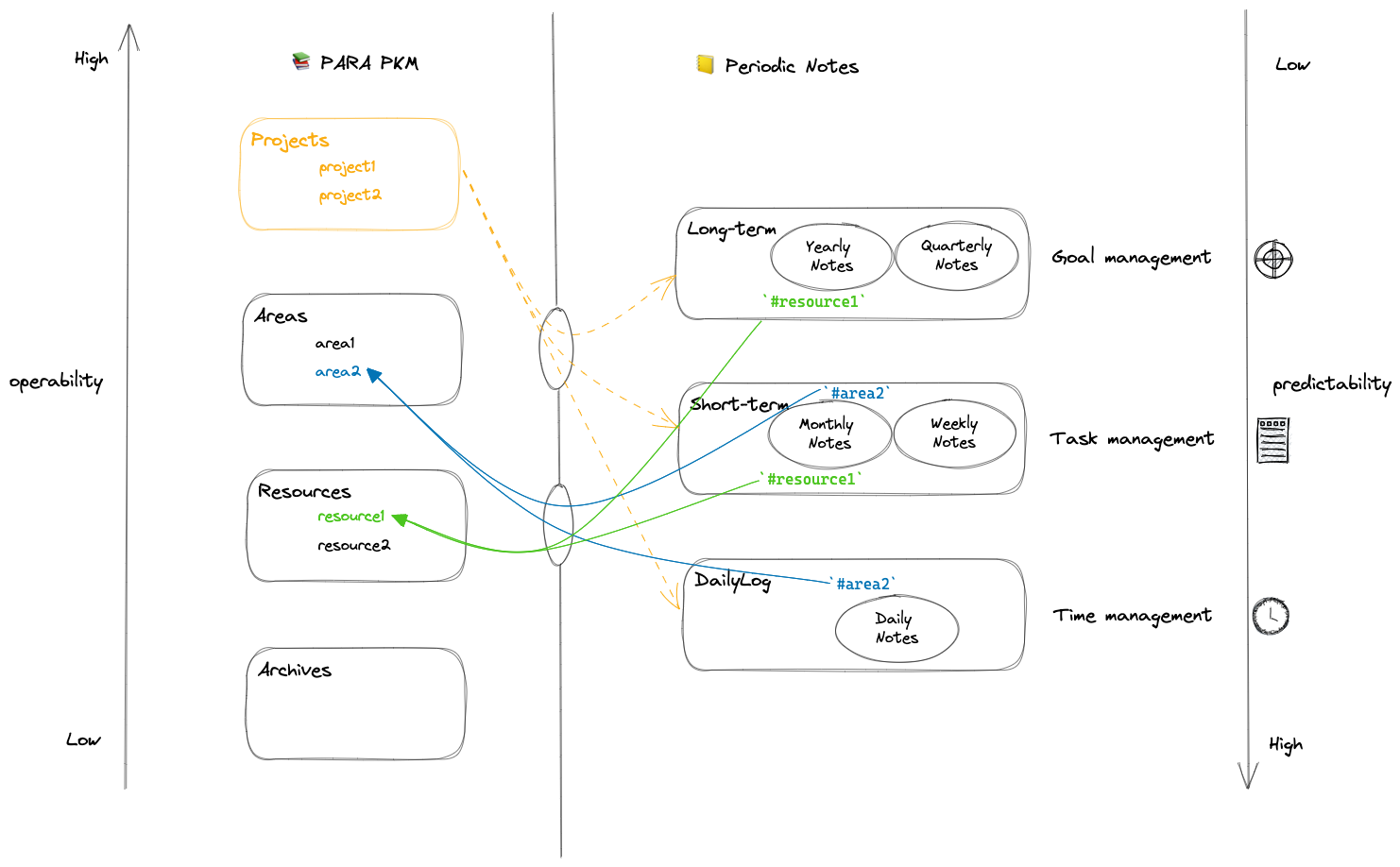
Treat the first-level folders under PARA as special tags (they don’t need to be exactly the same as the folder names), use them in “periodic notes,” then you can index uniformly in each PARA folder in the same way. This ensures that the README.md index in each PARA folder has all the context for the current topic:
Project Connection
Generate a project in “knowledge management,” to enhance focus on the project, there’s a “main event list” or “project list” in every class of “periodic notes,” such as:
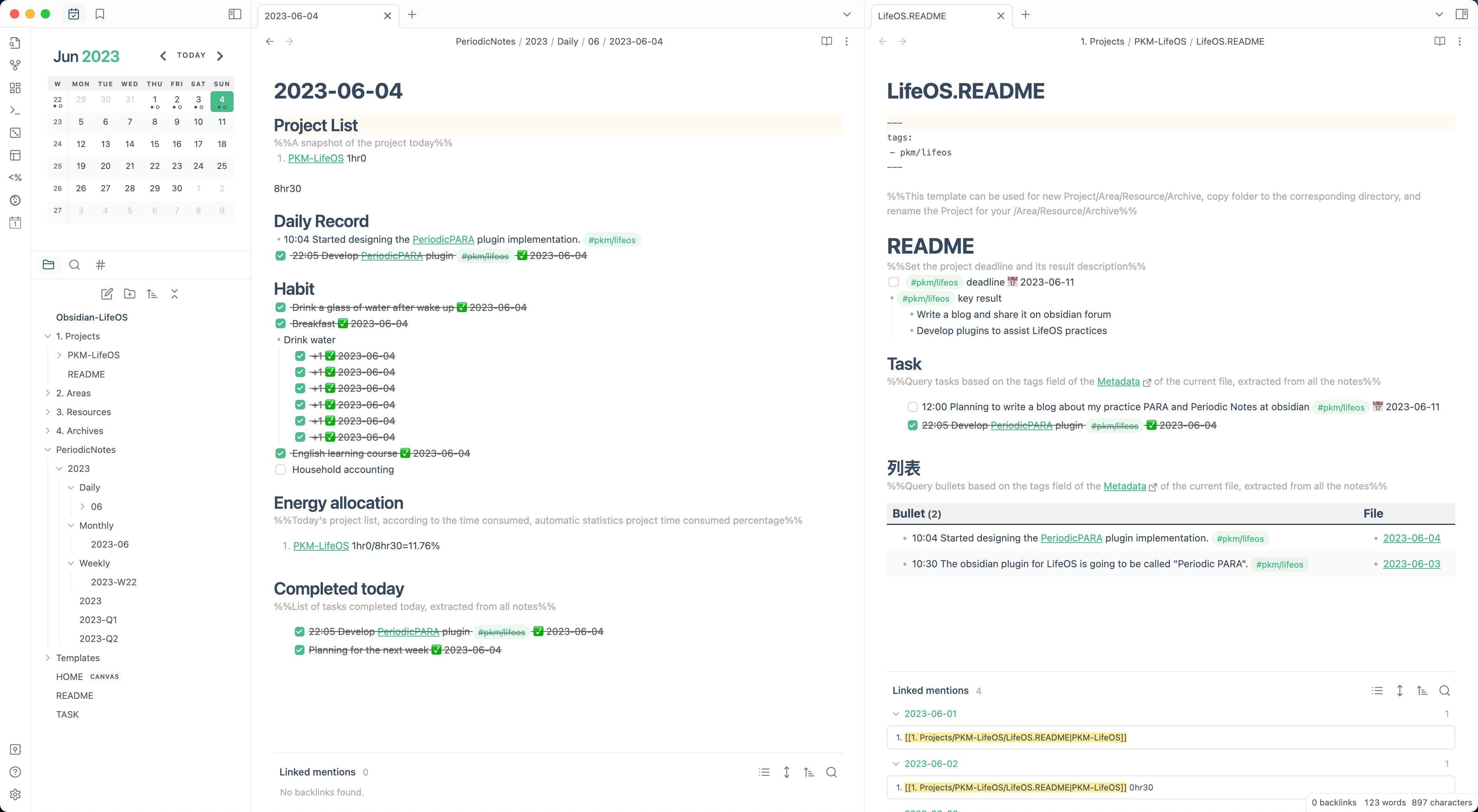
- The “project list” in the daily note is a snapshot of the current project list, used for calculating the time spent that day on various projects and their proportions, ensuring enough time is spent on projects.
- The “priority first dimension” in the weekly and monthly reviews automatically merge and deduplicate from the daily reviews of the week or month, used for arranging project dimension tasks and subsequent reviews.
- The “priority first dimension” in the quarterly review is a snapshot of the current domain list, used for arranging main event dimension goals and subsequent reviews.
- The “priority first dimension” in the annual review, automatically merged and deduplicated from the quarter’s priority first dimension, used for setting domain dimension goals and subsequent reviews.
Search
- Tags
- Index files
- For example, the README.md index of each project’s tasks, notes, and context.
- Folders
- For example, using a consistent directory structure for each PARA category.
Review
- The review focuses on the projects of the current period while planning the tasks for the next period.
- Weekly reviews reflect on the week’s daily notes, monthly reviews on each week’s reviews, and quarterly reviews on each month’s reviews.
Quick Start
Download
- Click here to download
- Open with obsidian and enjoy
Creating Notes
- Quickly create daily, weekly, monthly, seasonal, and annual notes through the note creation module in the upper left corner.
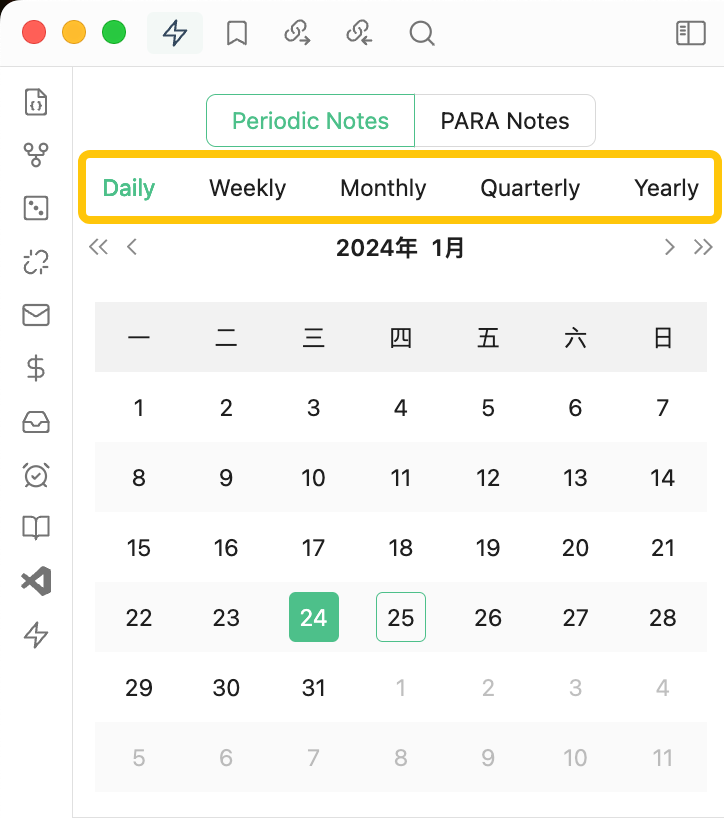
- Quickly create PARA notes, i.e., projects, areas, resources, archives through the note creation module in the upper left corner.
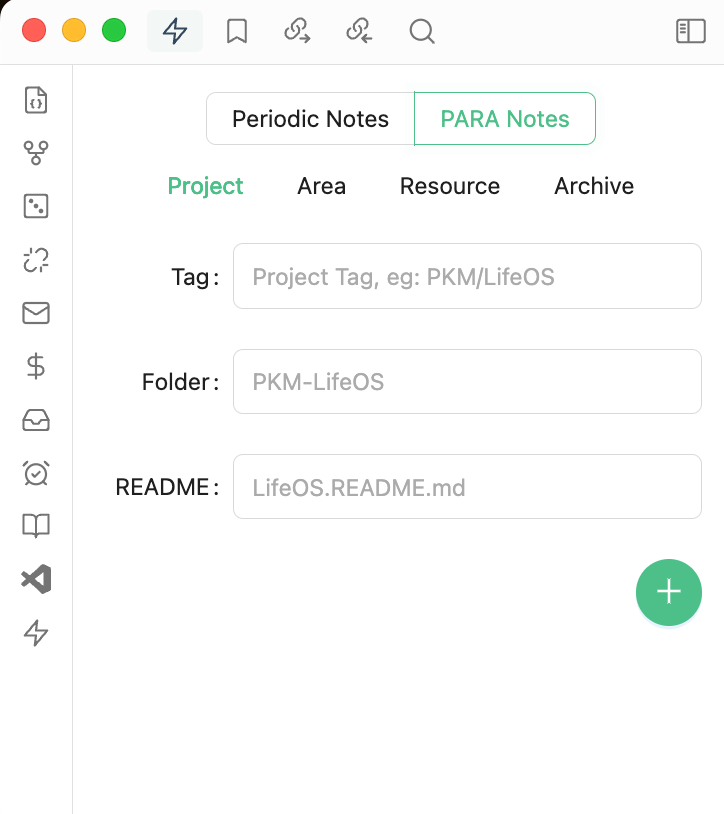
“Daily Note” and “Project README”
- Used for daily management, including project lists, daily records, habit tracking, energy allocation, today’s accomplishments, etc.
- The “project list” in the daily note is a snapshot of the current projects (i.e., under the Projects directory).
“Weekly Review” and “Monthly Review”
- Used for arranging weekly and monthly tasks, including task and review modules.
- In the weekly and monthly reviews, the “priority first dimension” are a collection of snapshots of the project lists from daily notes of the period (generated automatically).
- The “reviews” in the weekly and monthly notes mainly focus on the projects of the period.
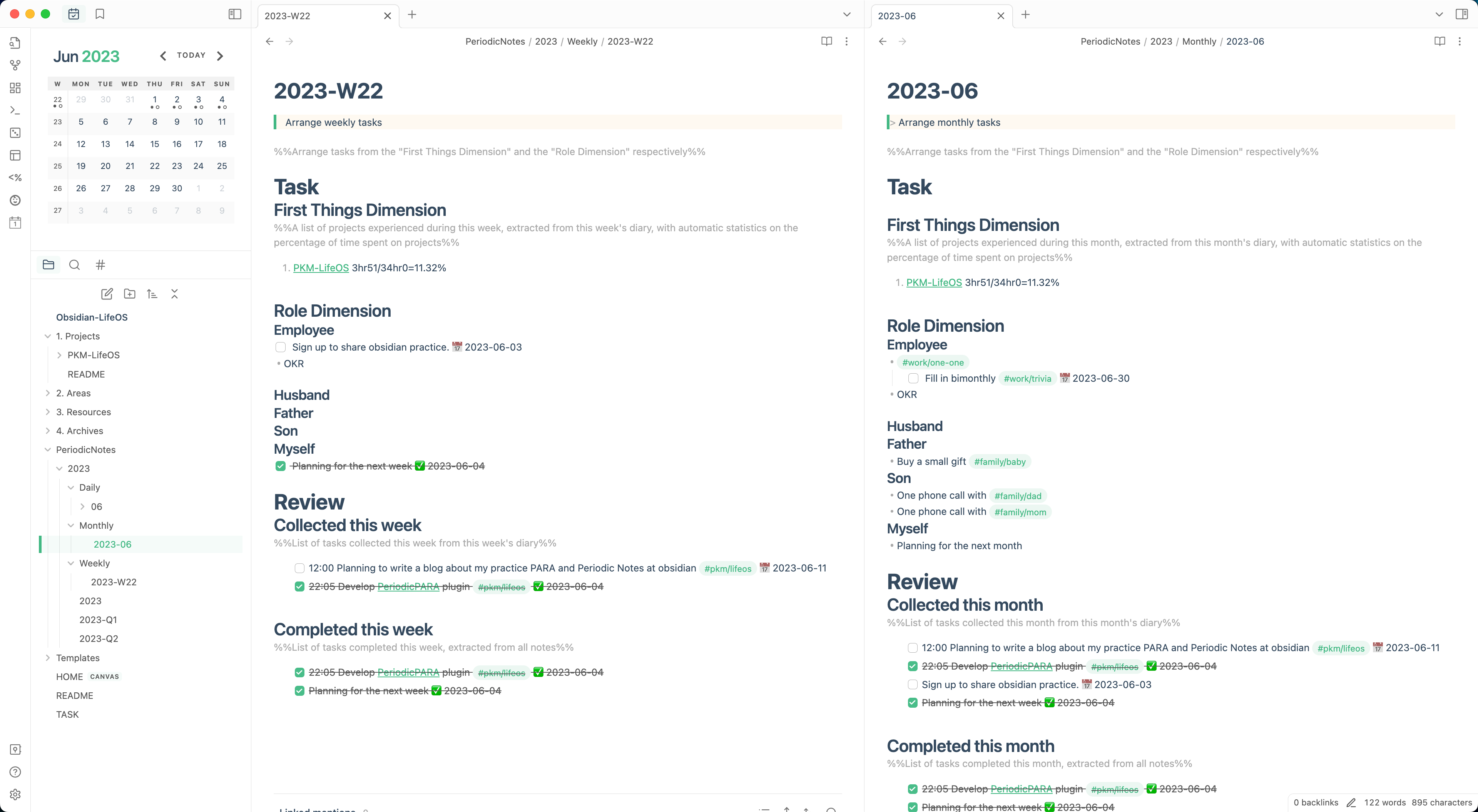
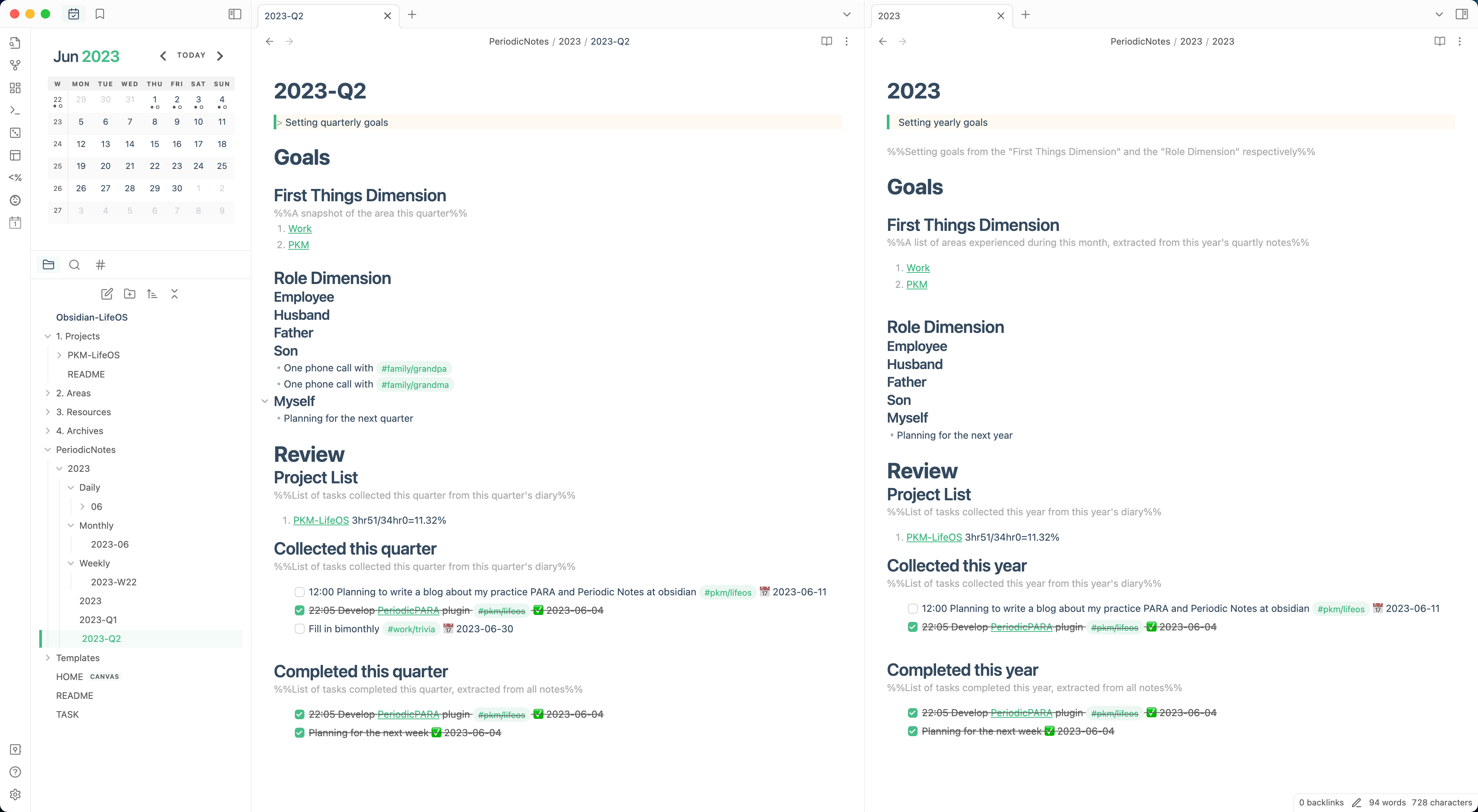
“Quarterly Review” and “Annual Review”
- Used for setting quarterly and annual goals, including goals and review modules.
- In the quarterly review, the “priority first dimension” is a snapshot of the current domain (i.e., under the Areas directory).
- In the annual review, the “priority first dimension” is a collection of snapshots from the priority first dimension of the period’s quarterly reviews (generated automatically).
- The “reviews” in the quarterly and annual notes mainly focus on the domains of the period.
“PARA Index” and “Task Index”
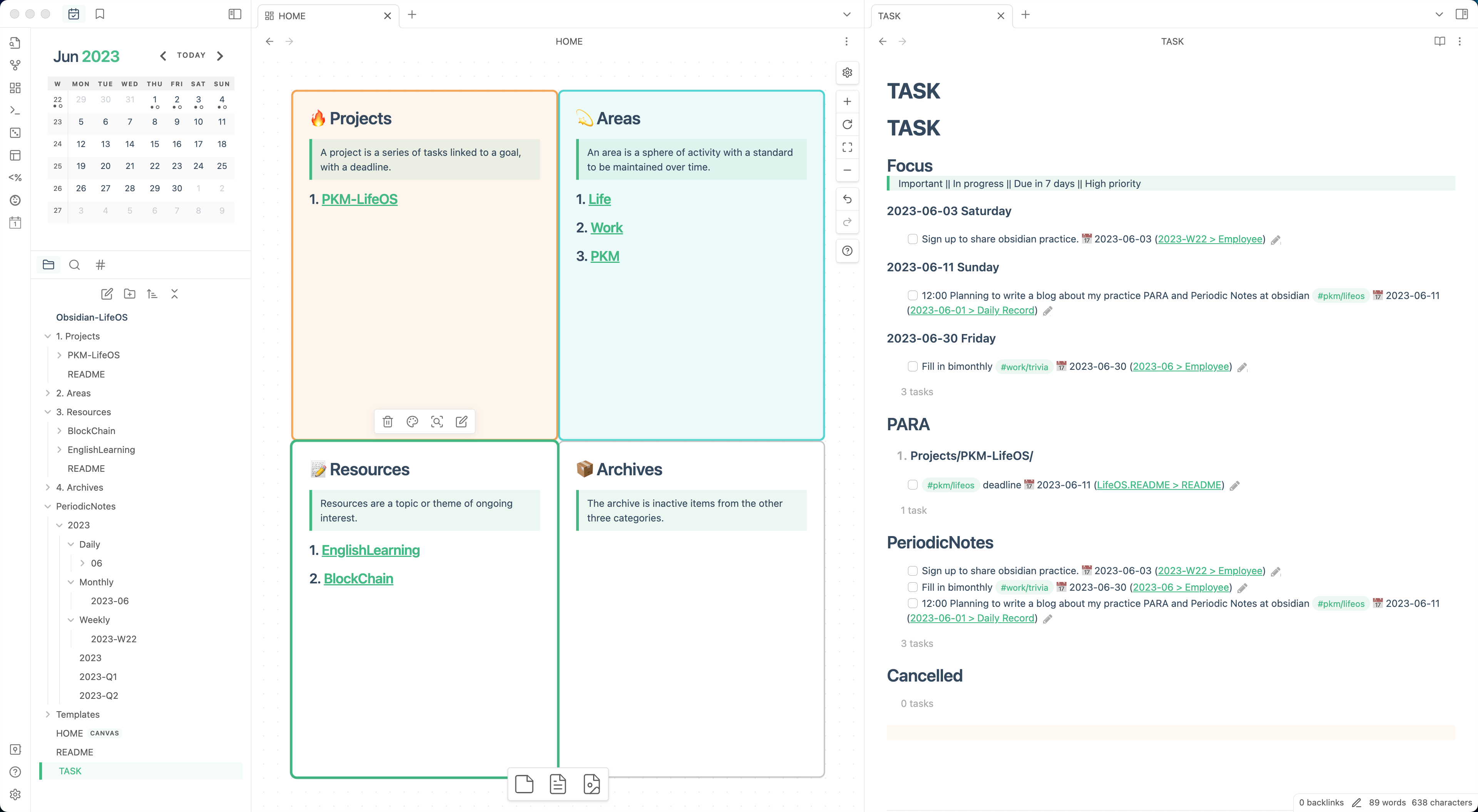
“Capture” and “Express”
First, let’s introduce a concept, the CODE model, where:
- C is for Capture: Collecting resonant information.
- O is for Organize: Sorting the collected information, i.e., PARA.
- D is for Distill: Extracting the essence of the content, selecting the most useful information.
- E is for Express: Sharing with others, applying your knowledge in practice.
Those familiar with PARA will see that this model is actually proposed by Tiago Forte in “Building a Second Brain,” and it’s the higher-level model that includes the PARA organization method, with O indicating the PARA organization method.
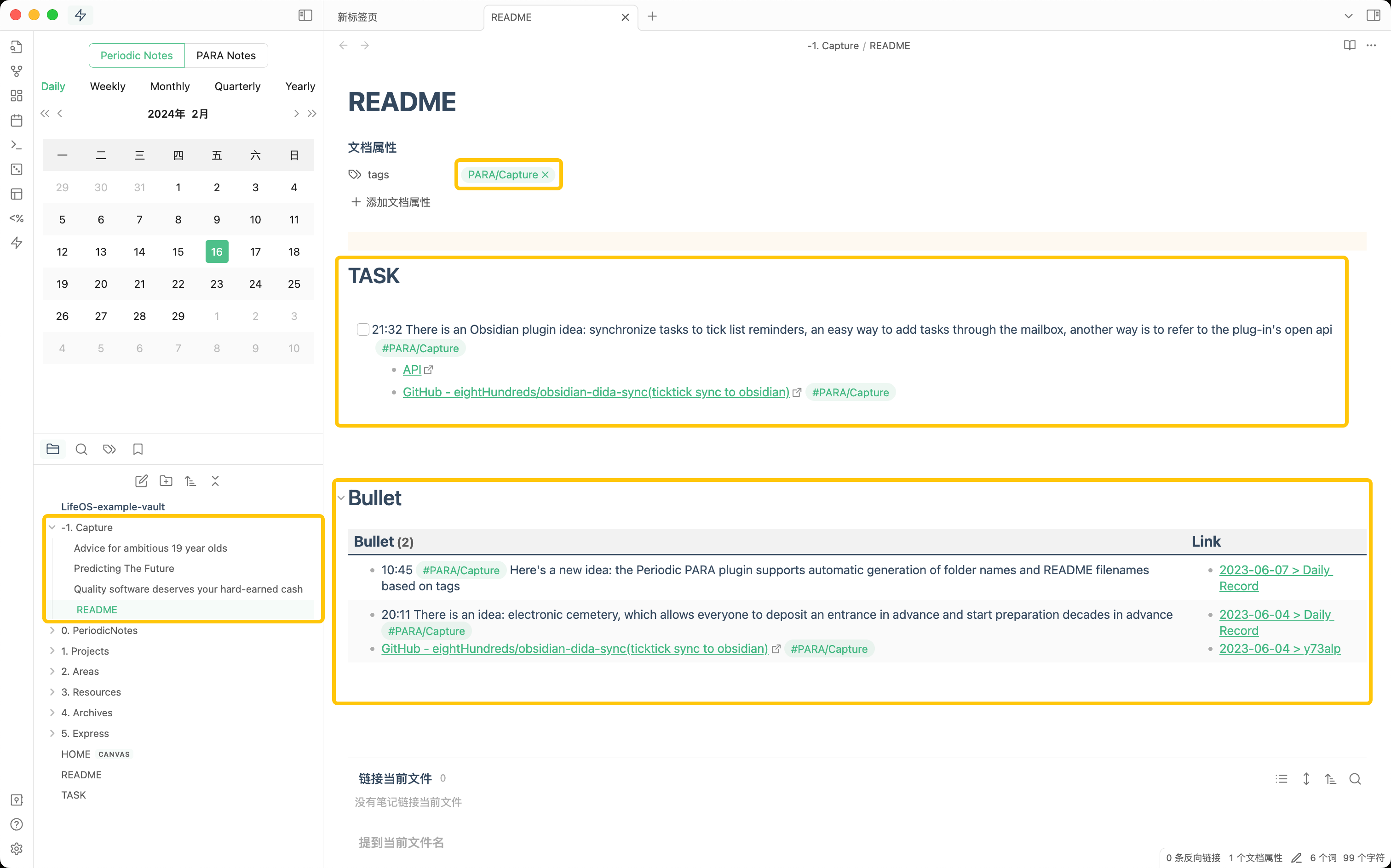
My practice is to temporarily store some marked articles in the “Capture” directory while using the “-1. Capture/README.md” file to index the notes tagged with #PARA/Capture scattered in the daily notes. This makes it convenient for me during specific time nodes, such as weekends, month-ends, and quarter-ends, to review and sort, first organizing marked articles into each PARA topical directory, then transferring some inspirational notes from the daily notes into some explicit to-dos;
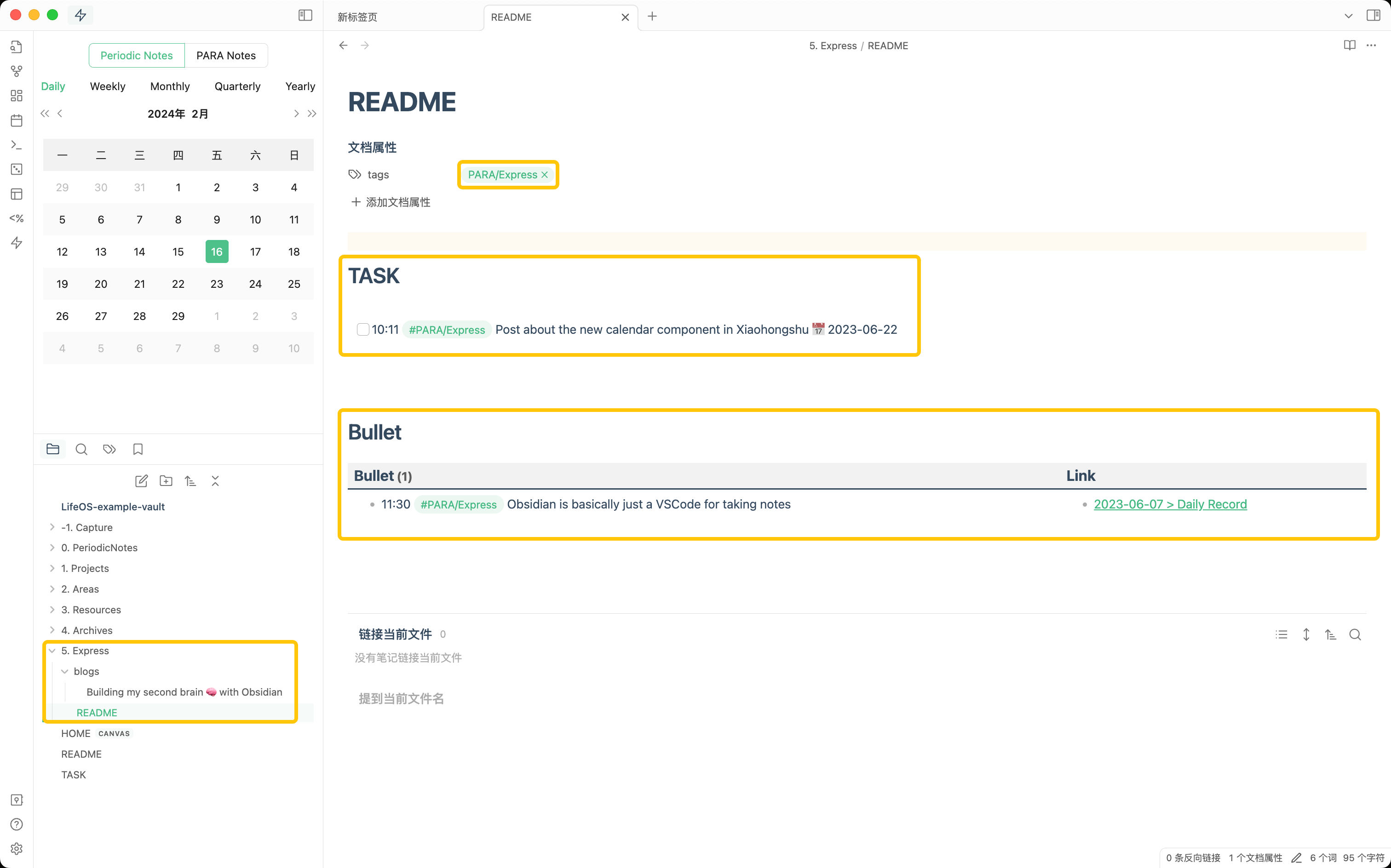
Next, let’s talk about “Express.” I place my blog in the express section and also record some fragmentary notes in the daily note tagged with PARA/Express. These are outputs after internalization. If this output needs to be further posted on a specific social platform, such as Zhihu or Xiaohongshu, I will conveniently record it as a task. When I review the tasks indexed in the “5. Express/README.md” file and find pending ones, just complete them one by one.
Small Tips in Practice
Buffer Zone Mechanism
Place less important and non-urgent items swiftly into a buffer zone (Inbox) by creating tasks, keeping the main focus on “Projects.”
Task Lists
Recording tasks shouldn’t be a mental burden – writing them down doesn’t mean they must be done. Having them written relieves your mind from having to continuously remember or fear forgetting them. I’ve recorded many tasks, many of which, upon reassessment, were indeed not completed.
It’s important to have mechanisms in place that allow for review of recorded tasks, for example:
- Using a tasks plugin to create query views for task lists
- Each periodic note contains a collected tasks list for the current period
- Project index files contain a tasks list
Task Reminders
I consider there to be three types of task reminders:
- Strong reminders, such as snapping up Moutai liquor or concert tickets, which need an alarm to remind you when it’s time
- Soft reminders, for things that need to be done on a certain day, like credit card repayments or loan repayments, which can be set up through GTD software for reminders
- List-style, for recording tasks which will be arranged later; based on the need, these can be converted to strong or soft reminders, akin to the inbox in GTD systems
Micro-Habits
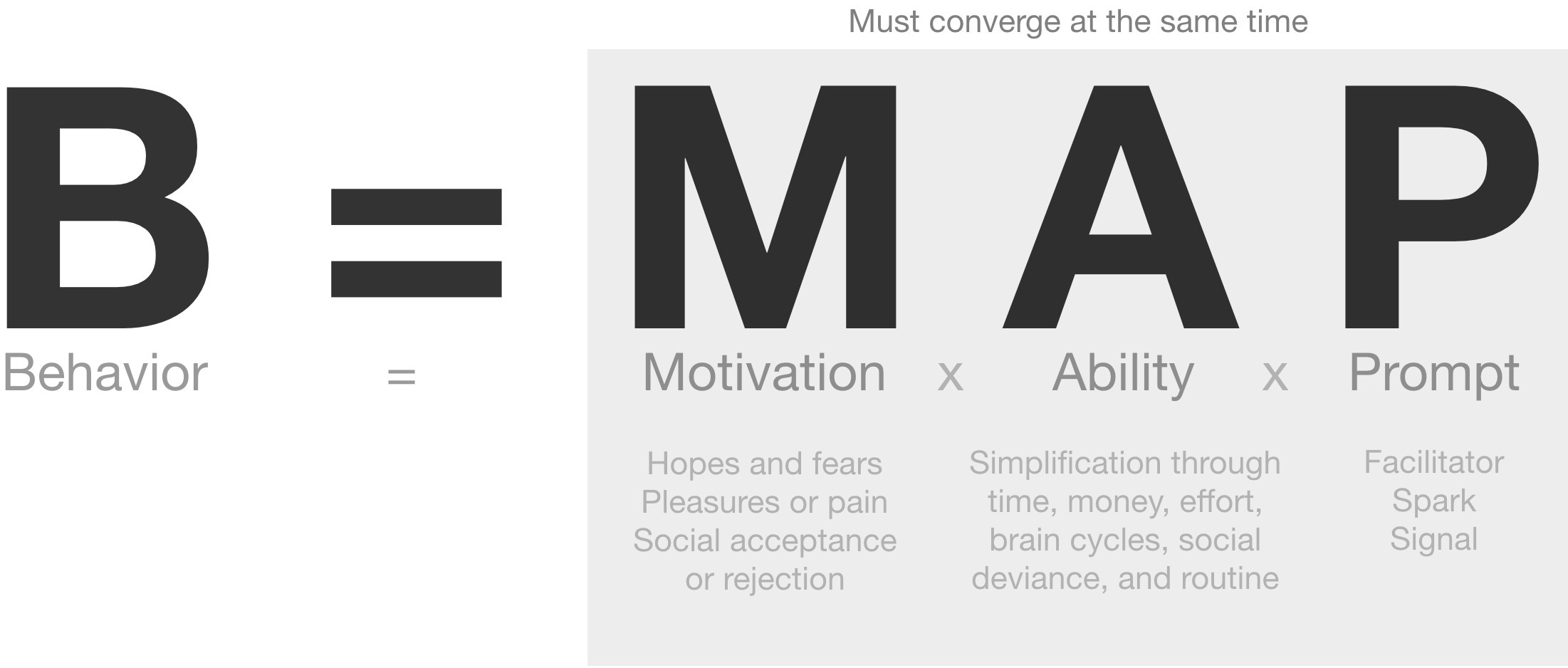
- I list micro-habits in my journal, and remember, they are not tasks. It’s okay whether they are completed or not; they mainly serve as a reminder, “Do you consider practicing these micro-habits today?” These act as prompts when I have the “capability” and “motivation.” For example:
- Micro-Habits
- Get up and drink water as soon as the alarm goes off
- Put on headphones and listen to the Little Universe podcast right after getting off the vehicle
- Open WeChat Read as soon as I get on the subway
- Write down three to-dos as soon as I reach my workstation
- Start serious work as soon as it’s 10:30 am
- Micro-Habits
Easy to Refactor
Within each periodic note, the same feature modules use the same statement, such as “tasks collected this period,” all inserted through the following query statement. The “this period” variable is provided by the current file name, which makes it very convenient to refactor all periodic files en masse, needing only to perform a batch replacement:
1 | ```PeriodicPARA |
Efficient Use of Shortcuts
Set consistent global shortcuts, so that no matter in which software, you can invoke the same function with the same shortcut. Here are some of my configurations:
- Cursor movement
- Pattern: Control + directional initial/VIM direction
- Examples:
- A: Head of line
- E: End of line
- F/L: Forward
- B/H: Backward
- N/J: Next line
- P/K: Previous line
- W: Delete a word (Backward)
- D: Delete a character (Forward)
- Window management
- Pattern: Command + Option + initial
- Examples:
- L: Left half of the screen
- R: Right half of the screen
- C: Center
- M: Maximize
[: Show/Hide left sidebar]: Show/Hide right sidebar- ‘: Show/Hide bottom bar
- T: New Tab (for more specific windows, the top level uses Command + T)
- W: Close Tab (for more specific windows, the top level uses Command + W)
- J: Next Tab
- K: Previous Tab
- Document editing
- Pattern 1: Command + Option + number/symbol
- Examples:
- 1: Markdown level-one heading
- 2: Markdown level-two heading
- 3: Markdown level-three heading
- 4: Markdown level-four heading
- 5: Markdown level-five heading
- 6: Markdown level-six heading
- Bulleted list: ~
- Strikethrough: -
- Function category
- Pattern: Control + initial
- Examples:
- C: Copy link (Obsidian block link, Arc browser link, VScode git link)
- D: Download
- I: Add to inbox
- K: Quick Search
Building my second brain 🧠 with Obsidian
http://quanru.github.io/2023/07/08/Building my second brain 🧠 with Obsidian