How Does Midscene Stay Model-Agnostic?
People often ask me: when Midscene says it is model-agnostic, does that just mean swapping base_url and model_name?
If a model were only text in, text out, then yes, that is about it. Swap the endpoint and move on.
But a visual UI Agent asks the model to do something different: it asks the model to look at a screenshot and tell us where some element sits on the screen. And that is exactly where the trouble starts, because every model family reports “where” in its own way. So for us, being model-agnostic was never as light as switching an API. It means quietly absorbing all those differences inside the framework, so the ai('click login') line you wrote does not have to change by a single character.
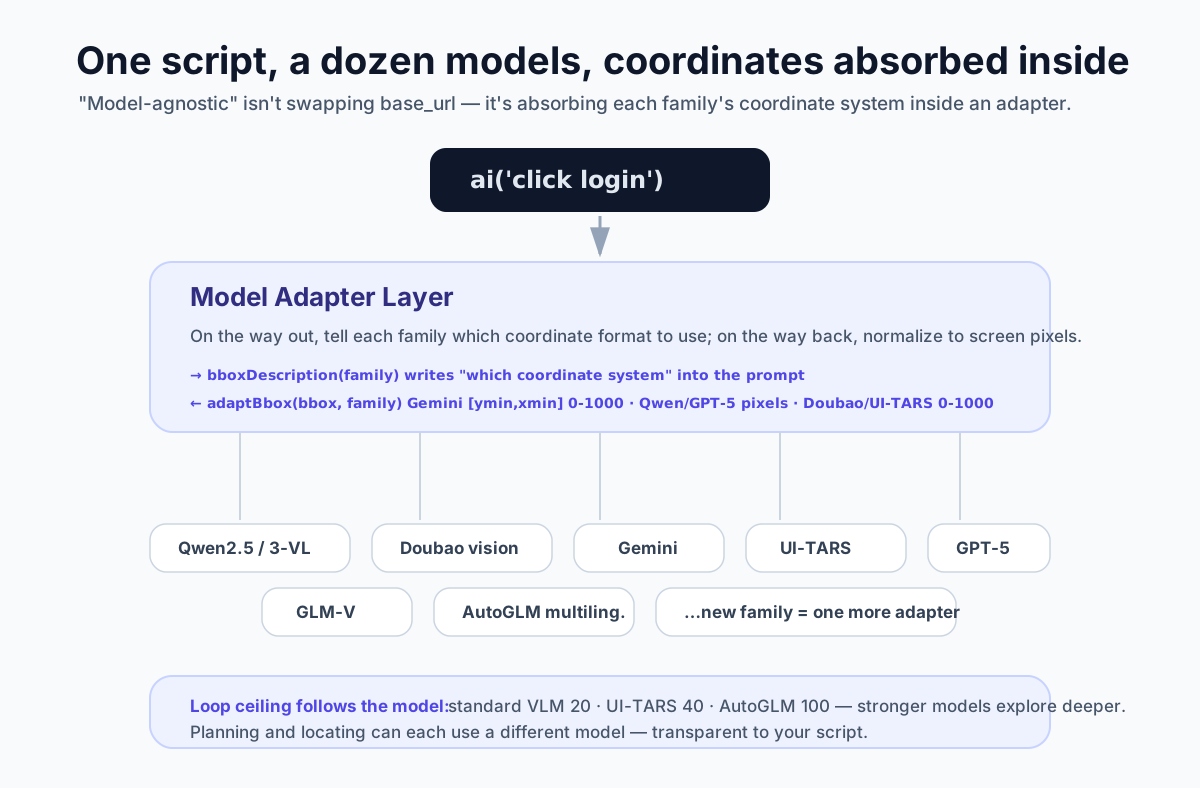
Let me break the differences we have to absorb into a few pieces.
Piece One: Every Model Has Its Own Coordinate System
When you ask a model to return an element’s bounding box, you find out the thing each one hands back is not even the same kind of thing.
Gemini gives you [ymin, xmin, ymax, xmax], normalized to 0 through 1000 — and notice it even flips the order of x and y, putting y first. Qwen2.5-VL and GPT-5 give you [xmin, ymin, xmax, ymax], in honest-to-goodness pixel coordinates. Doubao and UI-TARS go back to [xmin, ymin, xmax, ymax], but normalized to 0 through 1000.
If the framework looks the other way on these differences, the same sentence will click three completely different spots across three models.
So we adapt on both ends. When we send the request, the prompt tells the model which coordinate format to use based on the current model family (that part lives in bboxDescription); when we get the reply back, we convert the coordinates back to screen pixels by family (adaptBbox, which internally has its own conversion for Gemini, Qwen, GPT-5, and Doubao).
Once you go through that loop, your script always gets the same kind of coordinate, and it does not need to know which model is actually running underneath. Connecting a new model family is essentially adding a coordinate conversion, not making you go back and rewrite your cases.
Piece Two: Models Have Different Strengths, So the Loop Needs Different Room
A UI Agent runs as a loop: look at the screenshot, plan, act, look again. How many rounds this loop lets the model try — I first thought about using a fixed value, then realized it does not fit.
A strong model deserves more room to explore; a weaker one needs to be stopped earlier, otherwise it keeps walking down the wrong path and snowballs its hallucinations.
So this ceiling tracks the model family: an ordinary VLM gets 20 rounds, something like UI-TARS that was trained specifically for interface operation gets 40, and AutoGLM goes up to 100.
1 | const defaultReplanningCycleLimit = 20; // 标准 VLM |
When you switch models, this number follows along automatically. You do not have to remember it or tune it by hand.
Piece Three: One Script, but Planning and Locating Can Use Different Models
Midscene’s model configuration is split by “intent”, with three slots: default, planning, insight.
If you do not configure them, every task goes through that one default model, which keeps things simple. But you can also give “planning” a model that reasons well, and give “locating” a model that is good at finding things in an image, each playing to its strength.
This also propagates downstream. In the last post on Locate, I mentioned a detail: only when “planning and locating use the same default model” does Midscene enable the fast path that directly trusts the planning bbox. The judgment behind it comes down to this configuration — once you give locating its own model, the two models’ coordinate systems may not line up, so the framework automatically steps around that fast path. The choices you make in configuration ripple all the way down to the locating strategy, but all of it is transparent to your script.
So Which Models Does It Actually Support
By now you might want to ask: after all this talk, which ones does it actually support?
Right now there are over a dozen visual model families with dedicated adaptation: the Qwen line (2.5-VL, 3-VL, and newer), Doubao’s vision and seed, Gemini, UI-TARS (including a few Doubao variants), GLM-V, AutoGLM, and GPT-5.
“Dedicated adaptation” means everything above — each family’s coordinate system and output format has corresponding handling in the framework. Connecting one more is adding a layer to the framework, not making you rewrite your script.
What This Means for a Team
Once all these differences are absorbed into the framework, “model-agnostic” finally lands for real.
Its benefits are honestly pretty plain. The day some vendor cuts prices, you switch over overnight and your script does not move; a stronger new model comes out, you plug it in and compare it directly against the regression cases you already have; if some vendor takes the model you depend on offline, raises its price, or throttles it, you stopped relying on any single one of them long ago.
The value of an abstraction was never in the abstraction itself. It is in the day the thing underneath it actually changes, when you are not dragged along by it.
How Does Midscene Stay Model-Agnostic?
http://quanru.github.io/2026/05/27/How-Midscene-Stays-Model-Agnostic